Friday, December 9, 2011

Gmail and Contacts get better with Google+

We want to bring you a great experience across all Google products which, for Gmail and Contacts, means understanding what you care about and delivering it instantly. With that in mind, we’re introducing some new integrations with Google+ that we think will make Gmail and Contacts even better. If you use Google+, you can now grow your circles, filter emails and contacts by circles, keep all your contact information up-to-date automatically and share photos to Google+, all right from Gmail and Contacts.

Grow your circles from your email
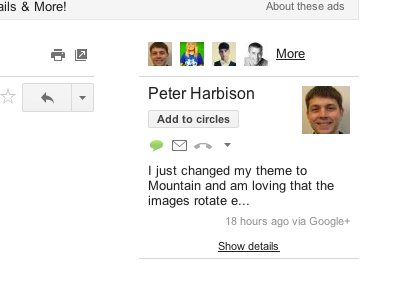
Now when you open an email from someone on Google+, you can see the most recent post they’ve shared with you on the right-hand side of the conversation. If they’re not in your circles yet, it’s easy to add them straight from Gmail.


Find information from the people you care about most
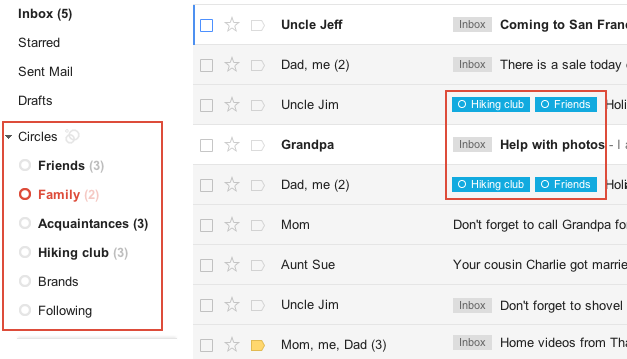
Looking for the info on an upcoming family holiday gathering but can't remember who sent it? If you've spent time building your Google+ circles, you can now quickly use them to filter your mail, saving yourself from having to sift through that pile of daily deal emails and newsletters. You can see messages from all of your circles at once or from each individual circle. And if you want, you can show circle names on emails in your inbox. Contacts can also be filtered by circles, making it easier to view your social connections.

Keep your contact information up-to-date automatically
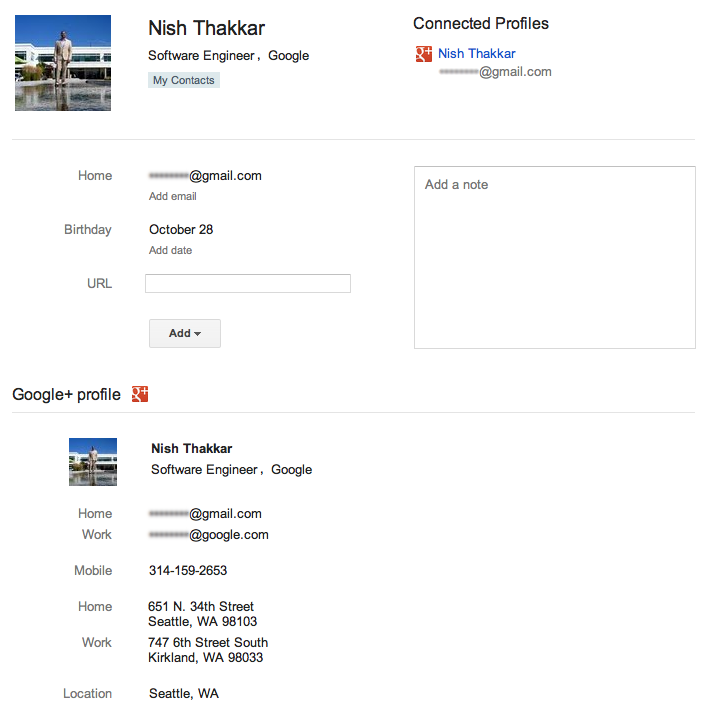
Manually entering contact information can be a huge time drain—so let your circles do it for you. If your contacts have a Google profile, their contact entry in Gmail will be updated with the profile information they’ve shared with you, including phone numbers, email addresses and more. If they change it in the future, you’ll get those updates automatically. You can also make sure the people you care about have your most up-to-date contact information by updating your own Google profile and sharing it.

Share effortlessly without leaving your inbox
Lots of great images are sent through email, but sharing those photos with friends on Google+ used to require downloading the image from Gmail and re-uploading to your profile. Not anymore: Now you can share photo attachments with one quick click. The image(s) will be uploaded to your Google+ photos and be viewable only to the circles that you choose to share with.


We’ll be rolling out all of these changes out over the next few days to Gmail, Gmail Contacts and the “standalone” version of Google Contacts at contacts.google.com. Please note that Google Apps users won’t see the Contacts updates quite yet, but we’re actively working to make them available.

All of these features (and the more to come) are the result of the great discussion that we had on Google+ with users in July. If you want to join in discussions like these, add the Gmail Google+ page to your circles. And if you haven't signed up for Google+ and would like to try these new features, visit this page to get started.

Thursday, December 8, 2011

Testing Gmail’s new look

Editor's note: This post, like yesterday's, is more technical than most posts here, but we thought some of you might find it interesting to look inside how Gmail works.

Yesterday, we talked about how we make changes like the new look to Gmail. The new look is not just visual, but involves completely different code in the interface. Testing a large user interface (UI) change like we launched for Gmail is foremost a permutation problem. Because all the Gmail features we wrote while we developed the new UI had to work both there and in the old existing UI, we basically needed to double our testing. Plus, the new UI has to work in many browsers, in all languages Gmail is available in, which means even more testing -- and by testing, we mean functional testing, latency testing, usability testing... you get the idea! The only way to handle all of these moving parts is through a) test automation, and b) using the new look.

We use automated tests as much as possible: we test if code changes lead to functional regressions, how they affect speed and our servers, if the UI breaks in many browsers and more. The scalable build and test infrastructure at Google allows us to run these tests automatically after every single(!) code change. However, a major UI change like this requires that our automated tests are very stable. If a test relies too much on the structure of the UI, then the test starts failing - not because the functionality is broken, but because it fails to work with the new UI. Luckily, we learned this lesson many years back and most of our tests did not have this problem.

But even the best automated tests can’t guarantee that everything is working well and that the visuals are pleasing. The only way to find out is to actually use the new look. For Gmail, we have special environment that gets updated every night with the latest stable code. Almost all Gmail engineers and a handful of other Googlers are using this environment for their real Gmail usage. But it turned out even daily updates were too slow for the rate of code change with the new look. So, we created an environment that updates every hour with the latest stable code. This version of Gmail was used by all engineers who worked on the redesign. It allowed us to test code changes very quickly on the real system. We were able to find many functional and usability issues here. And because we used this system and no engineer likes their email to be broken, issues were fixed very quickly. We can only do this because we have a very good coverage by our automated tests. When all these tests pass, we can be sure that most of the Gmail functionality is working. However, there could still be usability, color, layout or other challenges that tests can't catch.

Gmail’s new look also put a lot of additional load on our testing team. They had to keep up with a high rate of change, test critical functionality quickly and triage a lot of reported issues. Plus, they had to test new features in both the old publicly-available UI as well as the new unlaunched UI. The dedication of our testing team helped us catch bugs early so we could fix them in preparation for launch.

Once we felt that the new look was good enough to be used by others, we turned it on for all Googlers. At Google, we "eat our own dogfood," meaning we use new products and features ourselves before releasing them to the public. Often, this is a very humbling experience. The shiny, new features, that we just developed and are so proud of are now used by people, including sales teams, managers and other non-engineers, who just want to get their job done. And believe me, Googlers are not shy when it comes to feedback! But for a project like this one, this step is absolutely critical. Our different teams at Google tested Gmail in all kinds of use cases and the feedback that we received from this phase was invaluable. It helped us to put the final touches on the new look and get ready for usability tests that were previously discussed.

We hope you've enjoyed a look into the Gmail's design, development and testing of the new look.